Field notes · Coding agents

Why AI coding agents break things three files away.

Your agent changed a function and fixed every caller it could find. The tests it ran passed. The break surfaced three files away, through a wrapper it never followed, on the first invoice in production.

For engineering teams & anyone shipping with coding agents · 7 min read
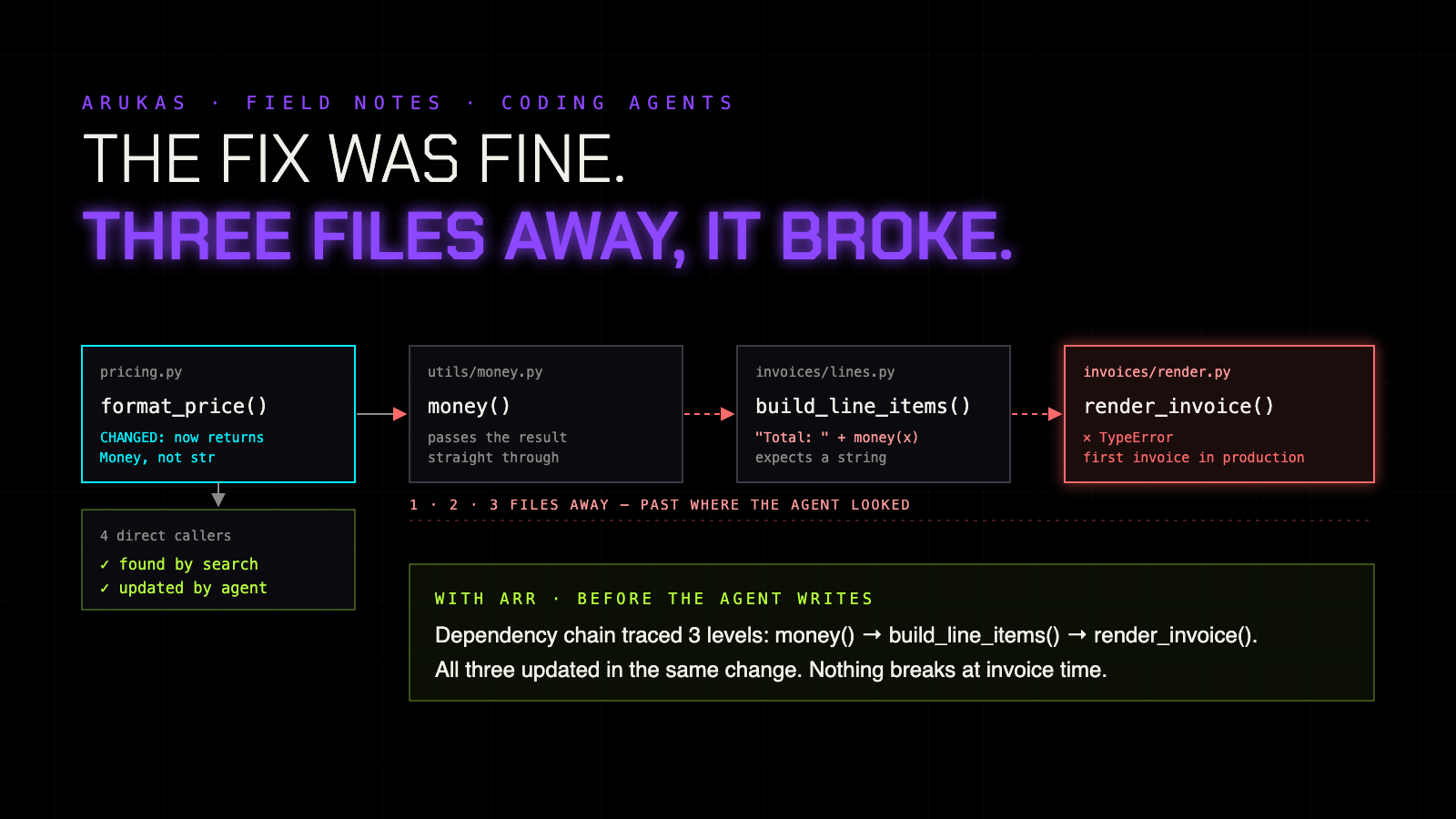
A dependency chain across four files. The agent changed format_price in pricing.py and updated its four direct callers. The change passed through money() in utils/money.py, broke string concatenation in build_line_items in invoices/lines.py, and surfaced as a TypeError in render_invoice in invoices/render.py, three files away.
Click to open full size
The story

Four callers fixed. The fifth one wasn't a caller.

You ask your coding agent to make format_price() return a Money object instead of a string. A reasonable change. The agent searches for format_price(, finds four call sites, and updates each one. One of them is money() in utils/money.py, a thin wrapper that just returns the result, so the agent decides it needs no change.

pricing.py format_price() changed → returns Money utils/money.py money() returns format_price(x) unchanged invoices/lines.py build_line_items() "Total: " + money(x) # expects str invoices/render.py render_invoice() TypeError: str + Money

build_line_items() never mentions format_price, so no search for that name will ever find it. It calls money() and glues the result onto a string. Two files further on, render_invoice() is where it finally blows up, the first time a real invoice is generated.

Agent summary
"Updated format_price and all 4 call sites. Tests pass."
true · thorough-looking · broken three files away
Why it happens

Agents see names. Breakage follows values.

Most coding agents navigate by searching text: find the name, open the file, edit the match. That finds direct callers well. It can't follow a value once it passes through a wrapper under a different name, so everything one hop beyond the wrapper is invisible.

A bigger context window doesn't rescue it. Loading the whole repository spreads the model's attention thinner rather than sharper, and agents still miss cross-file dependencies with everything in view (DEV, Augment Code). Language servers help with direct references, but they need to be running for each language and they stop at the first hop too.

01

Search the name

The agent finds every place format_price is written.

02 · where it breaks

The trail goes cold

The value flows on through money() under a new name. Text search can't follow it.

03

A confident summary

"All call sites updated." True for the ones it could see.

What our benchmark shows

Six tasks that decide whether a change breaks something.

This is the one field where we've measured ARR directly. We ran the tools coding agents rely on today against the same search tasks on real code. Here are the six that matter most for "will this change break something?"

ARUKAS internal benchmark · code corpus · S run
TaskText searchFile readsgitLanguage serverEmbeddingsARR
What breaks, several levels deep✕~✕~✕✓
What does this function call?✕~✕✓✕✓
Name defined in many places (warn me)~✕✕~✕✓
Files needed but missing~✕~✕✕✓
Is my earlier reading still valid?✕~~~✕✓
Which functions changed (no git, no backup)✕✕✕✕✕✓

✓ handles it · ~ partially · ✕ can't. Internal benchmark, not independently verified. A language server does answer "what does this function call?". We've kept that row in because it's the honest picture.

Five signs, five fixes

"All call sites updated." Then production disagrees.

01
Three files away

A change breaks code that never names it

The agent fixes direct callers. Callers of the wrapper, and their callers, break later in tests or in production.

✓ With ARR

The dependency chain is followed several levels deep before the change is written, so every affected caller is in the same change.

02
The wrong definition

Same name, several places

The agent jumps to the first config or utils it finds and edits that one. The one actually imported stays untouched.

✓ With ARR

You're warned when a name has more than one definition, with every one of them listed.

03
The stale read

A patch from twenty turns ago

The file changed since the agent read it. The edit lands on the wrong lines or quietly reintroduces deleted code.

✓ With ARR

The agent is told whether its earlier read is still valid before it writes.

04
The copy-paste twin

The bug lives in two places

A near-identical function with renamed variables doesn't match a name search, so the fix lands in one copy and the bug survives in the other.

✓ With ARR

Functions are matched by their shape, not their names, so every clone is returned and fixed together.

05
The phantom file

"Missing" files that aren't, and ones that are

The agent invents a stub for an import that really is missing, or tries to recreate system headers and generated code it simply can't see.

✓ With ARR

Genuinely missing files are listed, and kept apart from system, built-in and generated ones.

Why more tests aren't enough

Tests catch the break. After the agent has moved on.

Good test coverage will eventually catch the invoice bug. But by then the agent has finished, the change is in review or merged, and someone has to reconstruct a chain the agent never saw. Fixing it is cheapest before the agent writes, when the whole chain is known.

ARR sits under the agent you already use. It doesn't replace your model, your editor or your tests. It gives the agent what a careful engineer looks up before a risky change: what depends on this, and how far that goes.

A fair caveat

The table above is from our own internal benchmark on a code corpus. It isn't independently verified, and real repositories vary. Some tasks also look different on larger setups, which is why early access runs on your code, not ours.

Try this tomorrow

The wrapper test

  1. Pick a function that's used through a wrapper or helper somewhere.
  2. Ask your agent to change its return type.
  3. Run the full test suite, and list everything that broke beyond the direct callers it touched.

Everything on that list is a dependency your agent couldn't see. That's the part ARR traces.

Early access

Run ARR under your agent, on your codebase.

We're opening ARR to a small group of engineering teams first. Tell us how you ship with agents and we'll be in touch when your place is ready. No payment required.

More in ARUKAS Field Notes:
Your AI is answering from an old document
When legal AI gets the clause wrong
Chunking breaks meaning
Running parallel coding agents without them overwriting each other
Which version of the policy did your AI just apply?
AI citation errors start before the AI writes anything
Duplicate files, duplicate totals: where AI reconciliation goes wrong
What AI prior-art search doesn't tell you it missed
How ARR works →