Field notes · Accounting & audit

Duplicate files, duplicate totals: where AI reconciliation goes wrong.

Your AI assistant gave you a vendor total in seconds, itemised and confident. It was $13,400 too high, because one invoice had been saved to the folder twice and the AI counted both copies.

For finance teams, controllers & auditors · 6 min read
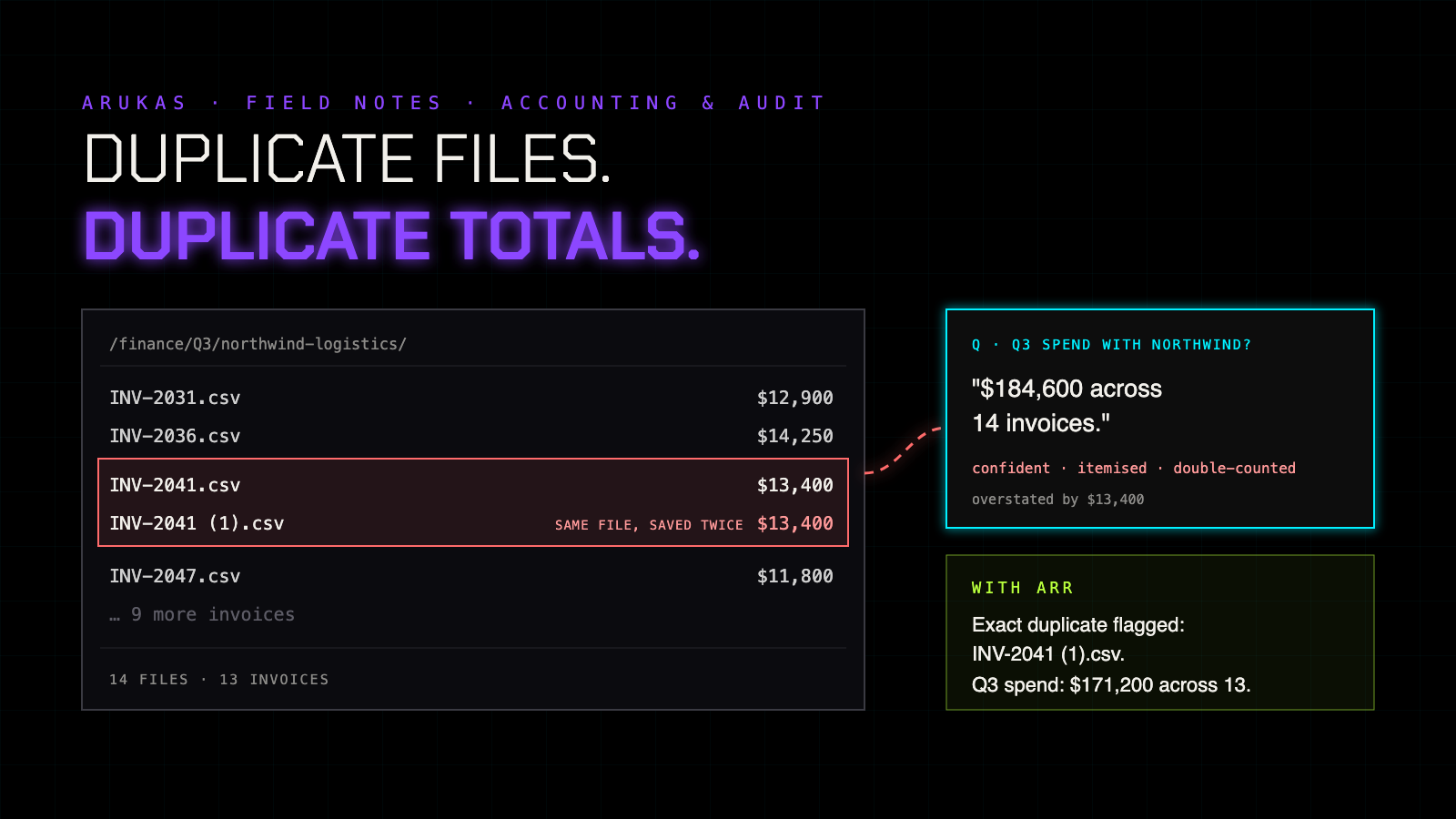
A Q3 invoice folder for a vendor with 14 files but only 13 invoices: INV-2041.csv was saved a second time as INV-2041 (1).csv. The AI reports $184,600 across 14 invoices, overstated by $13,400. With ARR the exact duplicate is flagged and the total is $171,200 across 13.
Click to open full size
The story

Fourteen files. Thirteen invoices.

It's quarter-end. Someone asks the finance AI assistant a routine question: what was our Q3 spend with Northwind Logistics? It reads the vendor's invoice folder and answers almost immediately.

AI answer
"$184,600 across 14 invoices."
confident · itemised · double-counted

There are 13 invoices. Back in August, someone downloaded INV-2041.csv from an email a second time, and it landed in the folder as INV-2041 (1).csv. Same file, same $13,400, counted twice. The real figure is $171,200.

Nobody spots it, because the answer looks thorough: every line traces to a real invoice. It only surfaces when the number fails to match the ledger, or worse, when it doesn't get checked at all.

Why it happens

Your AI reads files. Your ledger counts transactions.

Accounting systems are built to stop duplicates at the point of entry. AI assistants usually don't read your accounting system; they read what's around it: exports, spreadsheets, email attachments and shared folders. Those places are full of copies. A file saved twice looks like two documents, and an assistant that totals what it finds has no reason to think otherwise.

Duplicates are already one of the classic sources of overpayment and cash leakage in accounts payable (Ramp). An AI that reads every copy as new evidence makes the same mistake faster, and with more confidence.

01

Someone asks

"What was our Q3 spend with Northwind Logistics?"

02 · where it breaks

Every copy counts

The folder holds 14 files. The AI treats each one as a separate invoice.

03

A tidy, wrong total

Itemised, sourced, and $13,400 too high.

Five signs, five fixes

Every line traces to a document. The total still doesn't tie.

01
The double count

One file, saved twice

Your AI totals both copies of the same invoice or export as if they were separate records.

✓ With ARR

Exact duplicates are flagged across the whole collection, so each document is counted once.

02
The quiet disagreement

Two versions of the same statement

The trial balance was re-exported after an adjustment. Your AI reports figures from one version without noticing the other differs.

✓ With ARR

The versions are paired and you see exactly which figures differ before anything is reported.

03
The note beside the figure

"Includes $8,000 accrual reversed in October"

Your AI quotes the number and leaves out the adjustment noted right next to it.

✓ With ARR

When a figure and its note sit together, your AI is handed both.

04
The missing trail

A spreadsheet changed, no history

A reconciliation workbook was edited after review, and there's no version history to say what changed.

✓ With ARR

ARR shows what changed between documents, even with no history or backup to compare against.

05
One vendor, two names

"Northwind Logistics" vs "North Wind Logistics Ltd"

Your AI treats the two spellings as separate vendors, or misses one of them entirely.

✓ With ARR

Your AI still finds the record when the spelling is off.

Why your AP controls aren't enough

Your system blocks duplicate entries. Your AI reads the folder.

Your accounting or AP system is the right place to stop a duplicate payment, and it should stay that way. But the moment an AI assistant answers questions from exports, inboxes and shared drives, it's working outside those controls, in exactly the places copies accumulate.

ARR doesn't replace your controls or your review. It changes what the AI is handed: each document once, figures with the notes beside them, a clear signal when two versions disagree, and records found even when a name is spelled differently.

A fair caveat

ARR flags exact duplicates, the same file saved more than once. It won't catch a copy re-exported with a different layout, a near-duplicate invoice or a deliberately altered one; that's still the job of your AP controls and fraud checks. We've measured these abilities in our own benchmark on code and text, not yet on financial records, so treat this as how ARR is built to work here. That's what early access is for.
Try this tomorrow

The duplicate test

  1. Copy one invoice into a folder your AI assistant reads, with a slightly different file name.
  2. Ask it for the total spend with that vendor.
  3. Check whether that invoice was counted once or twice.

If it counted it twice, your AI isn't bad at maths. It was handed the same document as two pieces of evidence. That's the part ARR fixes.

Early access

Be one of the first finance teams to test ARR on real records.

We're opening ARR to a small group first. Tell us how your team works with its records and we'll be in touch when your place is ready. No payment required.

More in ARUKAS Field Notes:
Your AI is answering from an old document
When legal AI gets the clause wrong
Chunking breaks meaning
Why AI coding agents break things three files away
Running parallel coding agents without them overwriting each other
Which version of the policy did your AI just apply?
AI citation errors start before the AI writes anything
What AI prior-art search doesn't tell you it missed
How ARR works →